Power BI Connecting to a SQL Server Read-Only Replica
You have a SQL Server Always On Availability Group, and you’d like your Power BI model refreshes and DirectQuery to hit a readable secondary instead of pounding the primary. The question is: how do you actually get the Power BI / Power Query stack to connect to a readable replia?
Short answer: two options, and neither of them is a property of the Fabric/Power BI connection object. Both of them live in the Power Query (M) expression of the model itself, which means the same shared Fabric connection can be used by many models with different read/write intents.
Option 1 — Connect directly to the read-only replica
The simplest option is to just point Sql.Database at a instance hosting a readable replica. No special connection options needed:
1
2
3
4
5
6
let
    Source = Sql.Databases("sql-secondary-01.contoso.com"),
    db     = Source{[Name="SalesDW"]}[Data],
    fact   = db{[Schema="dbo", Item="FactSales"]}[Data]
in
    fact
This works, but it bypasses the AG listener entirely. If that secondary goes down your model is broken until it’s back up or someone edits the M. It also doesn’t get you the behavior of ApplicationIntent — SQL Server doesn’t know this connection “wants” to be read-only, so if the primary replica fails over to your target node you’ll be connecting to the primary instead of a readable replica.
Option 2 — Use MultiSubnetFailover=true against the listener
This is the option most people actually want. Power Query’s Sql.Database / Sql.Databases accepts a MultiSubnetFailover option, and enabling it causes Power Query to add ApplicationIntent=ReadOnly to the underlying connection string as well. That triggers read-only routing on the AG listener and you land on a secondary.
In Power BI Desktop you flip this with a toggle in the SQL Server database connector’s advanced options — the Enable SQL Server Failover support checkbox:
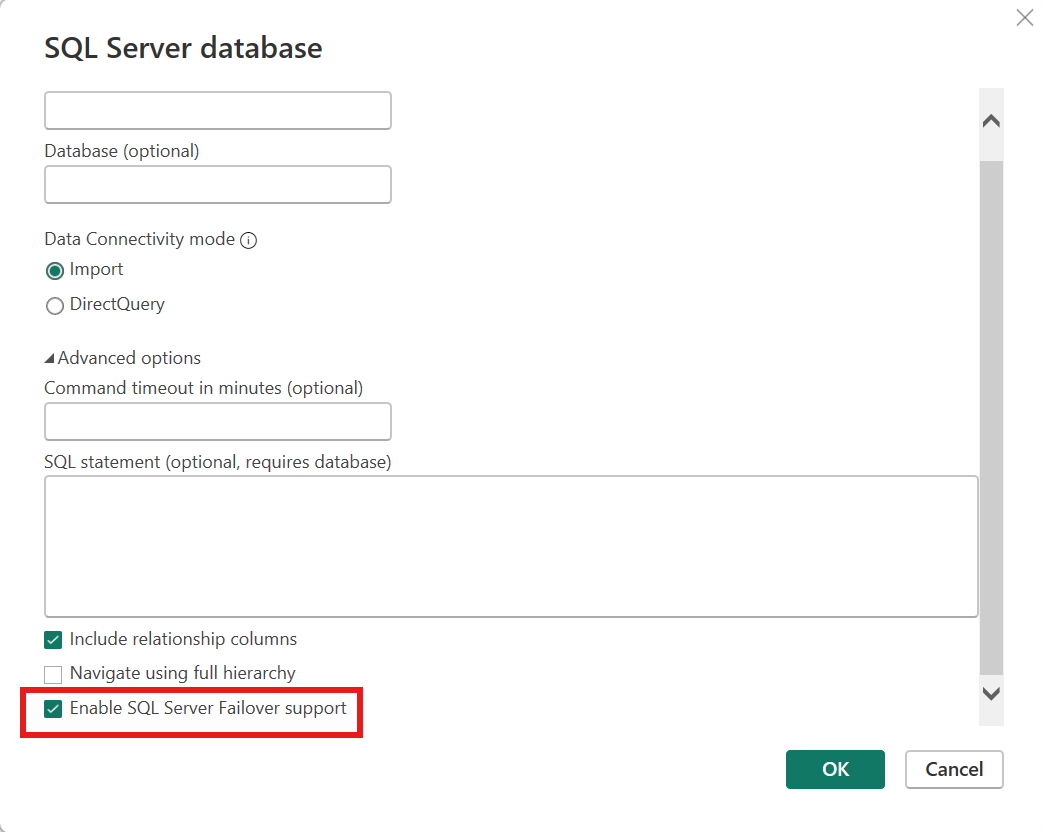
Toggling it produces an M expression like this:
1
2
3
4
5
6
let
    Source = Sql.Databases("ag-listener.contoso.com", [MultiSubnetFailover=true]),
    db     = Source{[Name="SalesDW"]}[Data],
    fact   = db{[Schema="dbo", Item="FactSales"]}[Data]
in
    fact
Two things worth calling out:
- It’s a Power Query setting, not a Fabric/Power BI connection setting. A single shared Fabric connection (with credentials, gateway, privacy level, etc.) can be reused across many models, and each model independently chooses whether to ask for read-only intent by way of its M expression. You don’t need a “read-only copy” of the connection.
- It only takes effect at the M level. If your model has multiple queries hitting the same server, each
Sql.Database(s)call decides for itself. Sharing aSourcestep (the typical pattern from the Desktop UI) keeps them consistent.
If your AG listener isn’t actually multi-subnet, that’s fine —
MultiSubnetFailover=trueis harmless on a single-subnet listener. The reason you’re flipping it here is the side-effect that it also setsApplicationIntent=ReadOnly, not because you need the failover behavior itself.
ApplicationIntent=ReadOnlyon its own does nothing unless the AG has read-only routing configured. Each replica needs aREAD_ONLY_ROUTING_URL, and the current primary needs aREAD_ONLY_ROUTING_LISTthat names the secondaries you want read-only traffic redirected to. If that’s not set up, the connection just lands on the primary and your refresh runs there — silently, with no error. See Configure read-only routing for an availability group for the full procedure, then verify with the XE session below.
A minimal routing setup looks like this — run on the primary, once per replica:
1
2
3
4
5
6
7
8
9
10
11
12
13
14
15
16
ALTER AVAILABILITY GROUP [AG1]
MODIFY REPLICA ON 'NODE1'
WITH (SECONDARY_ROLE (READ_ONLY_ROUTING_URL = 'TCP://node1.contoso.com:1433'));

ALTER AVAILABILITY GROUP [AG1]
MODIFY REPLICA ON 'NODE2'
WITH (SECONDARY_ROLE (READ_ONLY_ROUTING_URL = 'TCP://node2.contoso.com:1433'));

-- Routing list on each replica, applied while it is primary:
ALTER AVAILABILITY GROUP [AG1]
MODIFY REPLICA ON 'NODE1'
WITH (PRIMARY_ROLE (READ_ONLY_ROUTING_LIST = ('NODE2','NODE1')));

ALTER AVAILABILITY GROUP [AG1]
MODIFY REPLICA ON 'NODE2'
WITH (PRIMARY_ROLE (READ_ONLY_ROUTING_LIST = ('NODE1','NODE2')));
Verifying it actually worked
Trust but verify. SQL Server doesn’t expose ApplicationIntent in any of the obvious places — not in sys.dm_exec_sessions, not in sys.dm_exec_connections, and not even in the options_text of the sqlserver.login Extended Event (I checked — that field has the SET options, not the login packet’s app-intent flag).
What does expose it, reliably, on every login — even on a standalone non-AG instance — is the sqlserver.hadr_read_only_route_preconditions Extended Event, which has a ReadOnlyIntent boolean field. The engine fires this event during login regardless of whether the instance is in an AG, because the routing precondition check runs unconditionally.
Set up a tiny ring-buffer XE session:
1
2
3
4
5
6
7
8
9
10
11
12
CREATE EVENT SESSION [capture_appintent] ON SERVER
ADD EVENT sqlserver.hadr_read_only_route_preconditions
(
    ACTION (sqlserver.client_app_name,
            sqlserver.client_hostname,
            sqlserver.session_id,
            sqlserver.server_principal_name)
)
ADD TARGET package0.ring_buffer (SET max_memory = 4096)
WITH (STARTUP_STATE = ON, MAX_DISPATCH_LATENCY = 1 SECONDS);

ALTER EVENT SESSION [capture_appintent] ON SERVER STATE = START;
Then refresh your model and read the buffer:
1
2
3
4
5
6
7
8
9
10
11
12
13
SELECT
    n.value('(@timestamp)[1]','datetime2')                                AS ts,
    n.value('(action[@name="client_app_name"]/value)[1]','nvarchar(200)') AS app,
    n.value('(action[@name="session_id"]/value)[1]','int')                AS spid,
    n.value('(data[@name="ReadOnlyIntent"]/value)[1]','nvarchar(10)')     AS read_only_intent
FROM (
    SELECT CAST(xet.target_data AS xml) AS x
    FROM sys.dm_xe_session_targets xet
    JOIN sys.dm_xe_sessions xe ON xe.address = xet.event_session_address
    WHERE xe.name = 'capture_appintent'
) t
CROSS APPLY x.nodes('/RingBufferTarget/event') AS e(n)
ORDER BY ts DESC;
Refresh the model from Power BI Desktop, and refresh again from the Power BI Service via an On-prem Data Gateway. Both refreshes show up in the ring buffer. With MultiSubnetFailover=true set in the M, the read_only_intent column reads true for both. Without it, both read false.
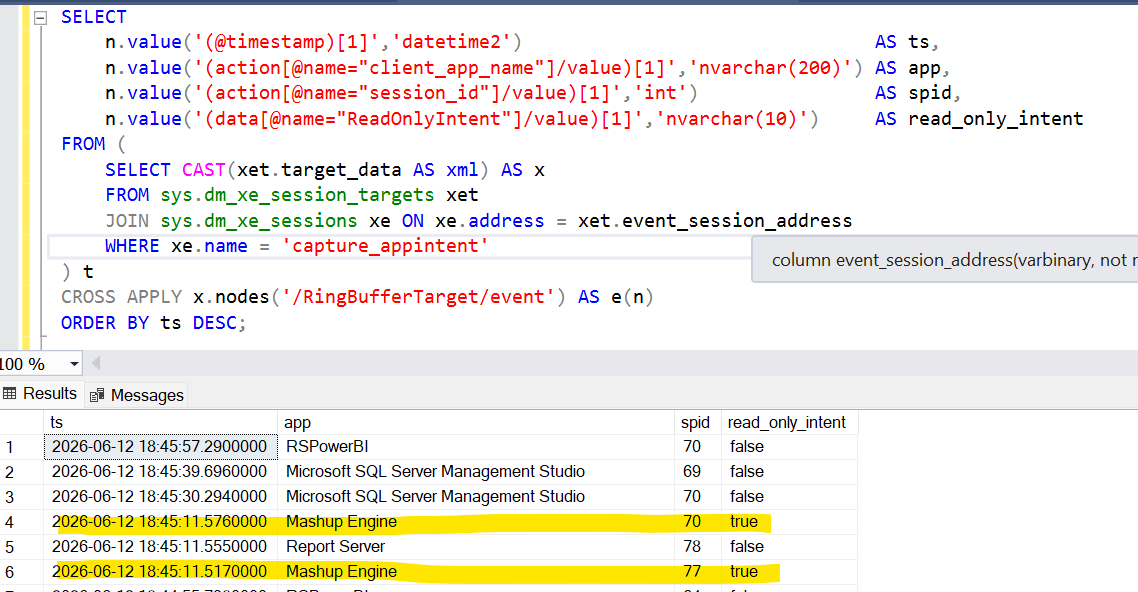
Note in the screenshot above how the Power Query / Mashup Engine rows (SPIDs 70 and 77) come in with read_only_intent = true, while SSMS, Report Server, and a non-readonly RSPowerBI connection on the same server all show false. That’s exactly what you want to see when the M expression has MultiSubnetFailover=true.
Sanity check from PowerShell, using SqlClient directly:
1
2
3
4
5
$cs = "Server=localhost;Integrated Security=SSPI;Encrypt=False;" +
      "Application Name=DavidTest_RO;ApplicationIntent=ReadOnly"
$c = New-Object System.Data.SqlClient.SqlConnection $cs
$c.Open()
$c.Close()
Then re-run the SELECT above — you’ll see a row for DavidTest_RO with read_only_intent = true.
What I’d actually do
- For production reports that should never write: use Option 2 (
MultiSubnetFailover=trueagainst the AG listener). It’s stable across replica failovers, it gets you read-only routing for free, and it doesn’t bake a specific server name into your model. - Verify it once with the XE session above so you know the connection arrives at the engine with
ApplicationIntent=ReadOnly. If the precondition check showsfalse, the M change didn’t take effect (often because a copy/paste created twoSql.Databasecalls and only one has the option). - Don’t try to do this from the Fabric/Power BI shared connection — there is no UI knob there for read-only intent. It’s an M-level decision per model.